Hotbox Menu
Context-sensitive quick actions menu
Overview
The Hotbox is a context-sensitive popup menu that gives you instant access to layout operations, backdrop tools, and commonly used NELSIG tools. It adapts its contents based on your current selection, showing only the actions that are relevant right now.
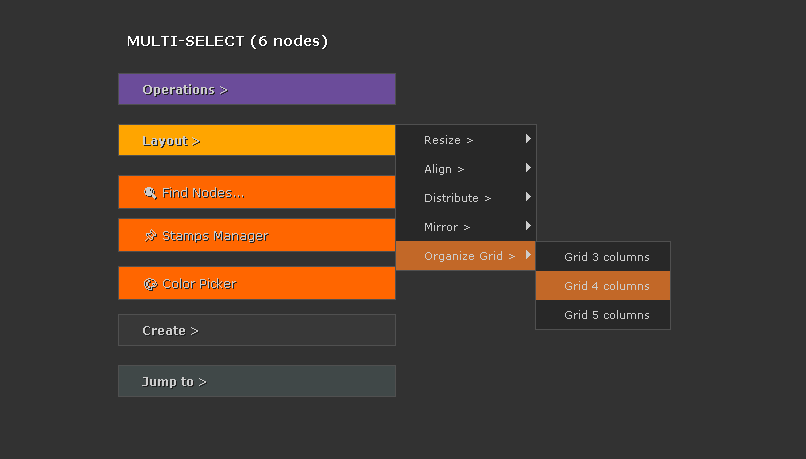
Opening the Hotbox
Press the ` (backtick) key while hovering over the node graph to open the Hotbox. The menu appears at the cursor position and closes when you click an action or press Esc.
Context Sensitivity
The Hotbox adapts its available actions based on what is currently selected in the DAG:
- No selection — General layout tools and creation actions.
- Single node selected — Node-specific actions plus Edit Similar, Color Panel, and Color Picker.
- Multiple nodes selected — Alignment, distribution, connect operations, and batch editing tools.
- Backdrop selected — Backdrop-specific actions like resize, fit to selection, and send to back.
Layout Section
The Layout section provides alignment and distribution tools for organizing nodes in the DAG. Select two or more nodes and use these actions:
Align
- Align Left — Align all selected nodes to the leftmost node's X position.
- Align Right — Align to the rightmost node's X position.
- Align Top — Align to the topmost node's Y position.
- Align Bottom — Align to the bottommost node's Y position.
- Center Horizontally — Center all nodes to the average X position.
- Center Vertically — Center all nodes to the average Y position.
Mirror
- Mirror Horizontal — Flip the selected nodes' positions horizontally around their center.
- Mirror Vertical — Flip positions vertically around their center.
Distribute
- Distribute Horizontally — Space selected nodes evenly along the X axis.
- Distribute Vertically — Space selected nodes evenly along the Y axis.
- Grid — Arrange selected nodes into a uniform grid layout.
Backdrop Section
Quick access to backdrop creation and management:
- Create Backdrop — Creates a new backdrop around the selected nodes with automatic padding. If no nodes are selected, creates a default-sized backdrop at the cursor.
- Fit to Selection — Resizes an existing backdrop to tightly fit its contained nodes, maintaining padding.
- Resize — Adjusts the backdrop size interactively.
- Send to Back — Pushes the selected backdrop behind all other backdrops, useful when backdrops overlap.
Operations Section
The Operations section provides connection tools and quick launchers for other NELSIG tools:
Connect Multi
- All-to-1 — Connect all selected nodes as inputs to one target node (useful for building Merge chains).
- 1-to-All — Connect one source node as input to all other selected nodes (useful for sharing a plate across multiple branches).
Tool Launchers
- Edit Similar — Open the Edit Similar spreadsheet for the selected node class.
- Edit Selection — Open Edit Similar in selection-only mode for the currently selected nodes.
- Color Panel — Launch the Color Panel grading interface.
- Color Picker — Open the Color Picker with HDR support and swatches.
Customization
The Hotbox shortcut and behaviour can be configured through the NGT Setup panel:
- Open NELSIG → NGT Setup from the Nuke toolbar.
- Navigate to the Shortcuts section.
- Set the Hotbox trigger key to your preferred shortcut.
Shortcuts
| Shortcut | Action |
|---|---|
| ` | Open Hotbox (default, configurable) |
| ` | Close Hotbox without action (press again) |